


If you’re looking to compare Boox tablets, two standout models deserve your attention: the Boox Note Air 4C and the Boox Tab Ultra C Pro. This Boox tablet comparison outlines key differences to help you decide which Onyx Boox device is better suited for your needs.
Before we start the detailed Onyx Boox comparison, it’s important to understand who these tablets are for. The Boox Note Air 4C review focuses on creativity, note-taking, and reading, while the Tab Ultra C Pro review highlights performance, multitasking, and productivity. Knowing your goals will help you decide which Boox tablet suits your workflow best.
Display and Build Quality
Both the Note Air 4C and Tab Ultra C Pro feature a 10.3-inch Kaleido 3 color E Ink display, supporting 4,096 colors. Their black-and-white resolution reaches 300 PPI, while color content is displayed at 150 PPI, ensuring clear visuals for reading, note-taking, and graphics.
However, their screen surfaces differ:
- The Tab Ultra C Pro has a smoother and clearer screen, providing sharper text and improved clarity, making it ideal for working with documents and reading. However, it offers less of a “paper-like” feel when writing.
- The Note Air 4C has a more matte surface, delivering a better paper-like writing experience, but the matte finish slightly reduces display clarity compared to the Tab Ultra C Pro.
In terms of design, the Note Air 4C is slightly thinner and lighter, measuring 226 x 193 x 5.8 mm and weighing 420 grams. Meanwhile, the Tab Ultra C Pro measures 225 x 184.5 x 6.6 mm and weighs 450 grams. Those who prioritize portability may find the Note Air 4C more convenient for travel and daily use.
This is a great starting point for anyone researching Boox Note Air 4C vs Tab Ultra C Pro or reading an in-depth Onyx Boox comparison to understand how both devices differ in build quality, performance, and daily usability.

Performance and Storage
In this Boox comparison, both models feature an octa-core processor and 6GB LPDDR4X RAM, ensuring smooth performance and efficient multitasking. However, the Tab Ultra C Pro has a larger 128GB internal storage, whereas the Note Air 4C offers 64GB. For those needing extra space, both models support microSD expansion, allowing for additional storage flexibility. Some users notice that the BOOX Tab Ultra C PRO might operate slightly faster, but this is noticeable only when comparing them side by side.
Software and User Experience
One key difference between the two is their operating systems. The Note Air 4C runs on Android 13, offering the latest security and feature updates, while the Tab Ultra C Pro operates on Android 12. Despite this, their interfaces are nearly identical, as both models run Onyx Boox’s customized Boox OS, which optimizes the software for e-paper displays. Additionally, both devices have access to the Google Play Store, allowing users to install various apps.

Battery Life and Power Efficiency
Battery performance is crucial for e-paper tablets. The Tab Ultra C Pro is powered by a 4,600mAh Li-ion Polymer battery, while the Note Air 4C features a 3,700mAh battery. The larger battery in the Tab Ultra C Pro translates to longer usage between charges, making it ideal for users who need extended screen time.
Additional Features
One of the biggest advantages of the Tab Ultra C Pro is its ability to connect to a dedicated cover with a built-in keyboard and trackpad. This feature transforms the device into a more laptop-like experience, allowing for faster typing, improved navigation, and enhanced productivity. This makes the Tab Ultra C Pro a more versatile option for users who want a device that can handle both reading and work tasks.
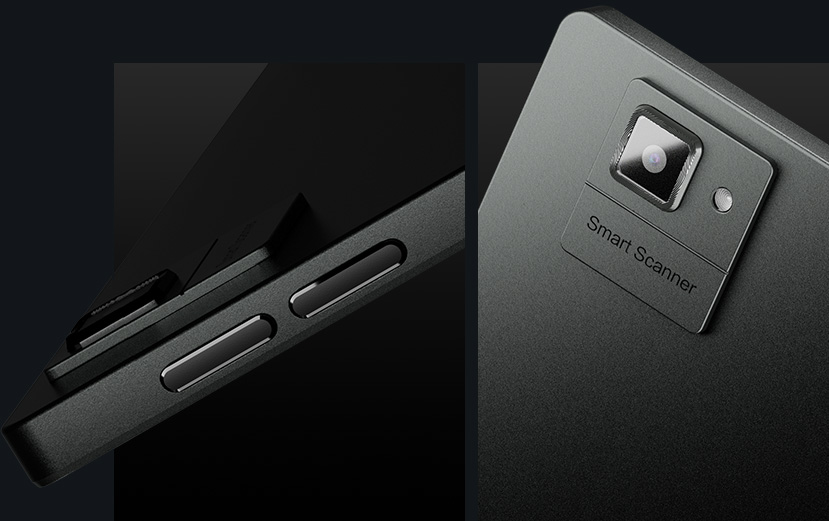
Additionally, the Tab Ultra C Pro includes a 16 MP rear camera with LED flash, allowing users to scan documents or capture high-quality images. This feature is particularly beneficial for professionals and students who frequently digitize handwritten notes or paperwork.

Buying in Canada: Why Choose Einktab?
When investing in a high-end E Ink tablet, local support matters.
- Our Canadian warranty reflects our pride in providing local service for what we sell. You won’t have to ship devices overseas to manufacturers. Your support remains local and hassle-free.
- Enjoy fast and free shipping on orders over $200 from our Toronto and Winnipeg warehouses!
- Price Transparency: All prices are listed in CAD, so you’ll know exactly what to expect, no surprise import duties or customs fees when your order arrives.
Quick Decision Guide: Who Wins?
Best for Writers & Artists: Note Air 4 C.
The paper-like screen film truly enhances your writing experience by making handwriting feel smoother and offering a better grip. Plus, it’s lighter and easier to hold with one hand, making it more comfortable and enjoyable to use.
Best for Professionals & Typists: Tab Ultra C Pro.
The dedicated keyboard cover with trackpad truly turns it into a compact laptop, making your experience much more convenient. Plus, BSR technology ensures that scrolling through websites and apps is incredibly smooth and effortless, enhancing your overall enjoyment.
Boox Note Air 4C vs Boox Tab Ultra C Pro — Comparison Table
Feature | Boox Note Air 4C | Boox Tab Ultra C Pro |
Best for | Writing-first: note-taking, journaling, sketching | Productivity-first: documents, typing, multitasking |
Display | 10.3″ Kaleido 3 Color E Ink | 10.3″ Kaleido 3 Color E Ink |
Color support | 4,096 colors | 4,096 colors |
Resolution (B&W / Color) | 300 PPI / 150 PPI | 300 PPI / 150 PPI |
Screen surface feel | More matte → more paper-like writing | Smoother/clearer → sharper text, less “paper” feel |
Build (size) | 226 × 193 × 5.8 mm | 225 × 184.5 × 6.6 mm |
Weight | 420 g | 450 g |
CPU / RAM | Octa-core, 6GB LPDDR4X | Octa-core, 6GB LPDDR4X |
Storage | 64GB | 128GB |
microSD support | Yes | Yes |
OS | Android 13 | Android 12 |
UI / Boox OS | Boox OS (similar interface) | Boox OS (similar interface) |
Battery | 3,700mAh | 4,600mAh |
Keyboard & trackpad support | No dedicated keyboard mentioned | Yes (dedicated cover with keyboard + trackpad) |
Camera | No | 16MP rear camera + LED flash (document scanning) |
Price (approx., 2025) | ~ $705 CAD | ~ $845 CAD |
Final Verdict: Which One is Right for You?
As shown throughout this Boox comparison, both the Note Air 4C and the Tab Ultra C Pro deliver excellent performance — but each excels in its own category.
- The Note Air 4C is more focused on writing. It has a matte screen for a paper-like feel, making it ideal for note-taking, journaling, and sketching.
- The Tab Ultra C Pro is more like a traditional tablet with better screen clarity, more storage, a larger battery, and keyboard support, making it a more universal device for both reading and productivity tasks.
Ultimately, if you prioritize a writing-focused experience, the Note Air 4C is a great choice. But if you want a more versatile tablet that can also function as a lightweight productivity device, the Tab Ultra C Pro is the better option.
Whether you’re considering the Boox Note Air 4C review or the Tab Ultra C Pro review, your decision should come down to your specific use case — writing vs productivity.
FAQ
What’s the main difference between the Note Air 4C and the Tab Ultra C Pro?
The main difference really comes down to how you plan to use them. The Tab Ultra C Pro offers innovative “Super Refresh” (BSR) technology and a pogo-pin keyboard connector, providing a smooth, laptop-like experience. Conversely, the Note Air 4 C is lighter, offers a more authentic paper-like writing feel, and is mainly designed for handwriting and reading, making it an ideal companion for those who love to write and read on the go.
Is the Tab Ultra C Pro faster than the Note Air 4C?
Yes! Both devices boast powerful processors, but the Tab Ultra C Pro goes a step further with its dedicated GPU for BSR (BOOX Super Refresh). This means app switching, web browsing, and scrolling feel much smoother and quicker compared to the Note Air 4 C, making your experience even more enjoyable.
Can I use the magnetic keyboard cover with the Note Air 4C?
No, the Note Air 4 C doesn’t have the pogo-pin connectors needed for the magnetic keyboard cover with trackpad. It’s designed to work only with standard Bluetooth keyboards.
Which device has better battery life, the Note Air 4C or the Tab Ultra C Pro?
Typically, the Note Air 4 C offers longer battery life for daily reading and writing. Although the Tab Ultra C Pro has a larger battery capacity (4,600 mAh compared to 3,700 mAh), its advanced BSR technology and GPU consume more power to support that ultra-smooth refresh rate. If you want to go several days without recharging, the Note Air 4 C is generally the more efficient and dependable choice.
Do both tablets support expandable storage?
Absolutely! Both the Note Air 4 C and the Tab Ultra C Pro feature a microSD card slot, allowing you to easily expand your storage whenever needed. This makes it simple to carry large collections of PDFs, audiobooks, and documents without worrying about running out of space.

As an Islamic scholar involved in non-profit educational work, I’ve carefully compared these models for Qur’an study, Hadith reference, and reading Arabic and Urdu Islamic texts. I’ve chosen the BOOX Tab Ultra C Pro because it offers greater storage, excellent note-taking features, and includes the Pen2 Pro.
Special thanks to Wendy from the Einktab.ca team for her thoughtful and detailed assistance throughout our email correspondence. Your guidance has been truly helpful.
I look forward to using this device for my ongoing educational efforts through The Ilahi Foundation of Canada.
Asma. MN
http://www.theilahifoundation.com
Thank you for your kindness and for sharing your feedback! It helps other customers choose the model that best fits their needs.