


If you’re a fan of digital note-taking, reading, or e-paper devices, you’ve probably used or considered a BOOX Note Air tablet. With the Note Air 4C and the newer Note Air 5C available in Canada, many users are asking: should I stick with my 4C or upgrade to the 5C? At Einktab, we break down the differences to help you make the right choice.
Quick Verdict: Keep the 4C or Upgrade to the 5C?
Short on time? Here is a quick breakdown to help you make your decision:
- Keep the Note Air 4C if: You primarily use it for reading, light note-taking, and are happy with the current speed. It remains an excellent, highly capable ePaper device.
- Upgrade to the Note Air 5C if: You need a faster processor, the latest Android 15 OS, improved writing latency, and want to use the new magnetic keyboard cover for laptop-like productivity.
- The Bottom Line: The 5C is a significant productivity leap for heavy users, while the 4C remains a solid, budget-friendly choice for casual reading.
Keep reading for a detailed side-by-side breakdown of all the upgrades.
Design and Display
Both tablets feature a 10.3-inch E Ink Carta display, but there are key differences:
BOOX Note Air 4C: Features a Kaleido 3 color ePaper display with adjustable front light. Great for reading PDFs, eBooks, and taking notes.
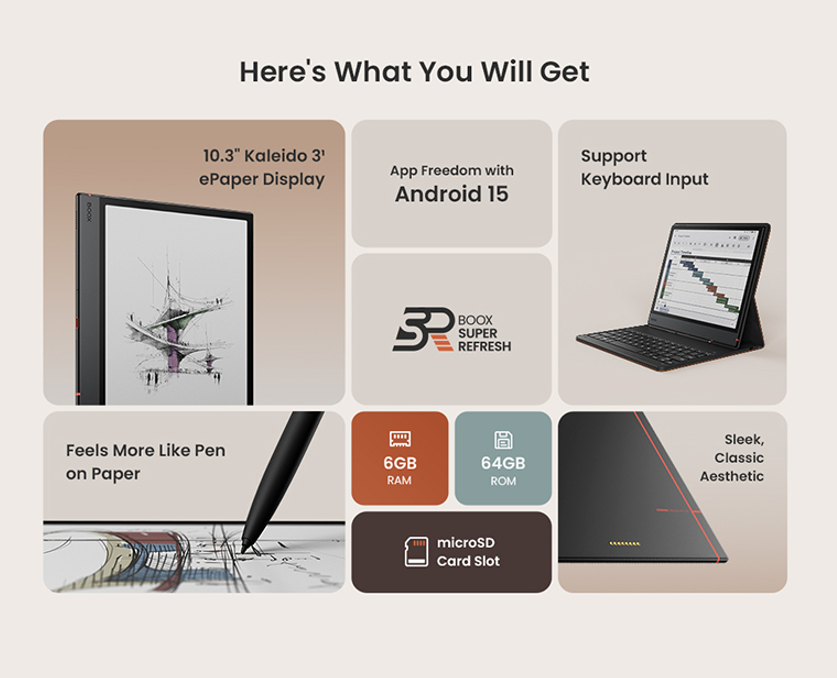
BOOX Note Air 5C: Same 10.3-inch color display but with improved contrast, smoother page refresh, and better front light uniformity, enhancing both reading and writing experience.
Performance and Software
Performance is where the 5C pulls ahead:
Note Air 4C: Runs Android 13 with 6GB RAM. Handles notes, PDFs, and light apps smoothly.
Note Air 5C: Runs Android 15 with 6GB RAM and an upgraded processor. Large PDFs, multitasking, and apps run faster and smoother.
Writing and Note-Taking
Both models support stylus input, but the Note Air 5C improves the experience:
Pen 3 stylus, reduced latency, better palm rejection, and more precise handwriting recognition.
Ideal for students, professionals, and artists who take frequent notes or annotate documents.


Keyboard Cover Compatibility
Note Air 4C: Does not support the new magnetic keyboard cover.
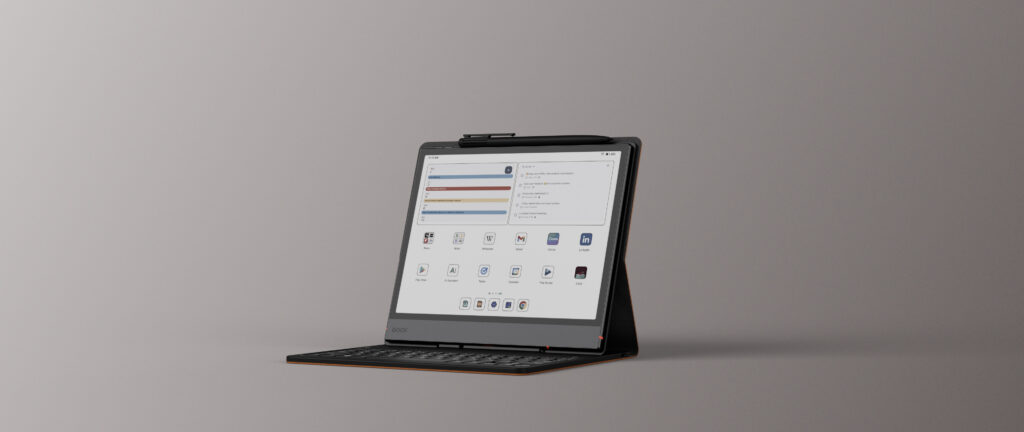
Note Air 5C: Introduces pogo-pin support for a magnetic keyboard cover, transforming it into a compact ePaper laptop. The keyboard includes a USB-C port for passthrough charging when attached.
Comparison Table: BOOX Note Air 4C vs Note Air 5C
Feature | BOOX Note Air 4C | BOOX Note Air 5C |
Display | 10.3″ E Ink Kaleido 3 (color) | 10.3″ E Ink Kaleido 3 (enhanced) |
Contrast & Refresh | Good | Higher contrast, smoother refresh |
Front Light | Adjustable | Improved light uniformity |
Processor | Standard | Upgraded, faster |
RAM | 6 GB | 6 GB |
Operating System | Android 13 | Android 15 |
PDF Performance | Smooth | Faster with large PDFs |
Stylus Support | Standard Pen support | Pen 3 with reduced latency |
Writing Latency | Low | Even lower, more paper-like |
Handwriting Recognition | Accurate | More precise |
Keyboard Support | No | Magnetic keyboard (pogo-pin) |
Keyboard USB-C Passthrough | No | Yes |
Best Use Case | Reading & light note-taking | Work, study & heavy note-taking |
Future-proofing | Limited | Strong (Android 15) |
Should You Upgrade?
Keep the Note Air 4C if:
You primarily read and take occasional notes.
Budget is a concern.
Upgrade to Note Air 5C if:
You need faster performance.
You want the best writing and reading experience for PDFs, notes, and eBooks.
- Keyboard input is essential for work or study, making typing tasks faster and more comfortable.
You want future-proof software with Android 15.
Ready to Upgrade? Why Buy Your BOOX from Einktab Canada?
Whether you decide to stick with the 4C or upgrade to the powerful 5C, choosing a reliable local distributor makes all the difference.
- Local Canadian Warranty: No shipping overseas for repairs. We handle claims right here in Canada.
- Fast & Free Shipping: Get your new device quickly (2-4 days) with tracked delivery via trusted Canadian carriers.
- No Hidden Fees: The price at checkout is final. No surprise customs duties or import taxes upon delivery.
- Expert Advice: Still unsure which model suits your workflow? Contact our Canadian support team for personalized guidance.
Explore our e-reader collection with confidence, knowing you are backed by fast, reliable, and completely local Canadian service!
Conclusion
At Einktab, we offer both the Note Air 4C and Note Air 5C e-ink tablets for Canadians who are seeking eye-friendly and digital reading solutions. Your choice depends on whether you prioritize affordable pricing or enhanced performance and an upgraded writing experience.
Frequently Asked Question
If you mainly read eBooks and PDFs, the Note Air 4C still works well. The Note Air 5C is worth upgrading to if you want faster performance, a better writing feel, and longer software support with Android 15.
The difference is noticeable when working with large PDFs, multitasking, and running Android apps. The Note Air 5C feels smoother and more responsive overall.
Yes, for basic productivity tasks like writing, note-taking, and document editing. The magnetic keyboard cover makes it a convenient, lightweight ePaper device for such tasks, but it isn’t suitable as a replacement for a full laptop when handling intensive workloads.
Styluses are compatible, but the magnetic keyboard cover is exclusive to the Note Air 5C due to its pogo-pin hardware support.
Students and professionals will benefit more from the Note Air 5C due to its speed and keyboard support. Casual readers and budget-focused users will find the Note Air 4C perfectly adequate.
